-2.webp?width=52&height=22&name=211112-BEPA001-IZIX-LOGO-RVB_POS_1%20(1)-2.webp)
Content
- Why should I use the Izix App?
- How do I use it?
- Common Issues
- Additional information and troubleshooting
1. Why should I use the Izix App?
The App allows you quick and easy access to view your bookings, make a reservation, open the barrier and manage your vehicles, all from your phone.
2. How do I use it?
a. Overview
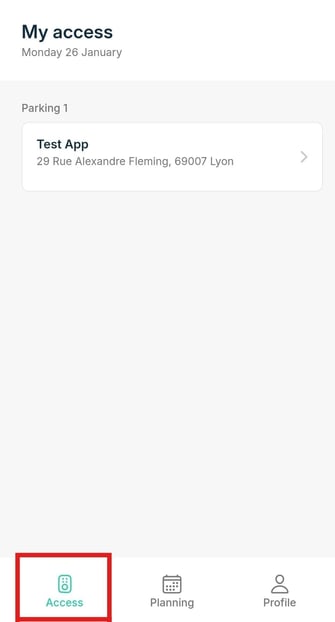
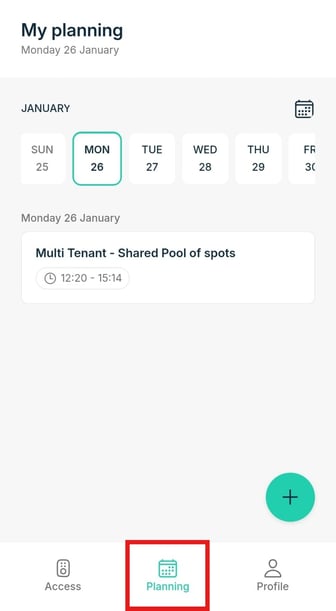
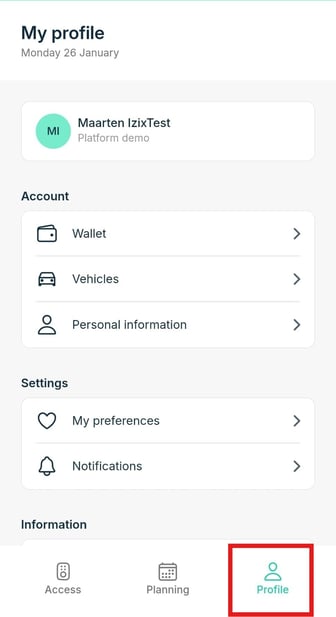
The App is very straightforward and user-friendly with 3 tabs, Access, Planning, and Profile making your parking experience easy and clear.
b. Access
On this tab you can grant yourself direct access to the parking you're about to enter, with the click of a button.
Please beware that your phone has to be in physical range of the barrier.
Definition: Access at Izix is referring to the digital remote control you have available on your Izix application on your smartphone. This button will enable you to open the gate of the parking lot.
Need help or want more information about the Access tab?
c. Planning
This tab shows the reservations that exist for your account. And of course, you can make new bookings here.
Need help or want more information about the Planning page?
d. Profile
On the Profile tab, you can view the following:
-
Accounts & Organisations - Select your organisation
-
Account
- Wallet - Coming soon
- Vehicles - Manage your license plates
- Personal information - Manage your personal information and change the app language
- Settings
- My preferences - Coming soon
- Notifications - Coming soon
- Information
- Help - Shows App information and a link to helpful articles about the app
- Terms of use - Read our Terms of use
- Privacy Policy - Read our Privacy Policy
- Sign out
3. Common Issues
If you are missing any accesses, please firstly contact your parking/office administrator. In most cases, you were not granted the required access rights.
For any common application issues, please see below references: