-2.webp?width=52&height=22&name=211112-BEPA001-IZIX-LOGO-RVB_POS_1%20(1)-2.webp)
Contents
1. How it works
Cancelling your parking reservation is fast and simple:
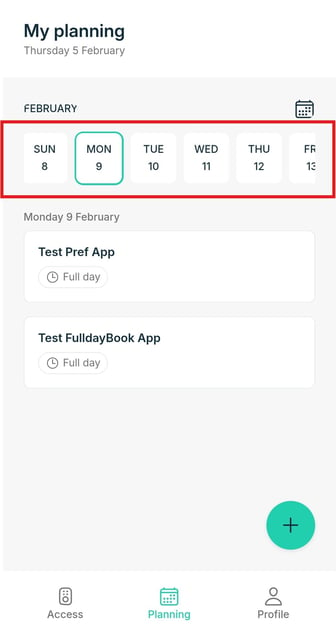
- Find your reservation in the Planning page. The page shows your reservations by day, so for future bookings slide the date picker and click the desired day.
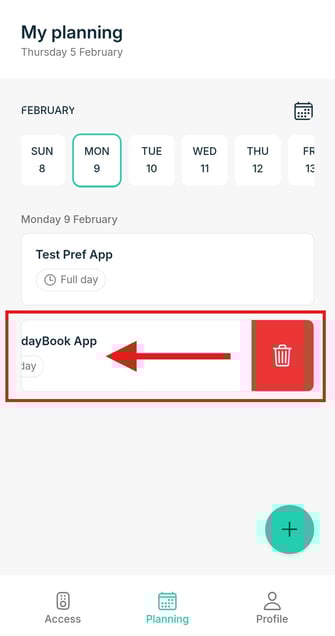
- Slide the booking to the left, and the cancellation button will appear.
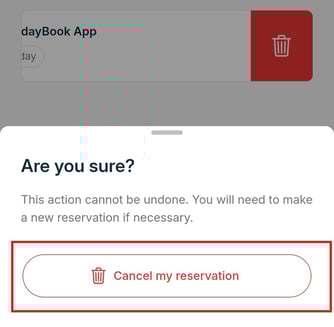
- Confirm your choice and the app will show you when it is successfully cancelled.
2. Tips
- Use this quick cancellation when you know you won't use your booking so others can make use of the spot. And in case it was a credit-based booking, you get the credits refunded automatically.
Note: For credit-based bookings, when the start time of your reservation is in the past, it is no longer possible to get an automatic credit refund when cancelling the reservation. In this case, contact your organisation to get a refund. Admins always have the possibility to refund the user in our Parking Management Interface.