-2.webp?width=52&height=22&name=211112-BEPA001-IZIX-LOGO-RVB_POS_1%20(1)-2.webp)
Definition: A profile is a user within an organisation. It means that each user is linked to one or various organisations by their profiles. The profile contains all the information of that user.
This article is intended for administrators. If you are a user and wish to update your own profile, please refer to this article instead.
Contents
1. Why should I edit a profile?
Izix relies on multiple technologies, such as licence plate recognition or app usage. These technologies require the identification of the user who wants to access the parking lot. It is therefore essential that profiles are up to date.
As an administrator, you have the ability to modify the information of a profile at any time. Solely the email and password of a user cannot be changed.
2. How to edit profile information?
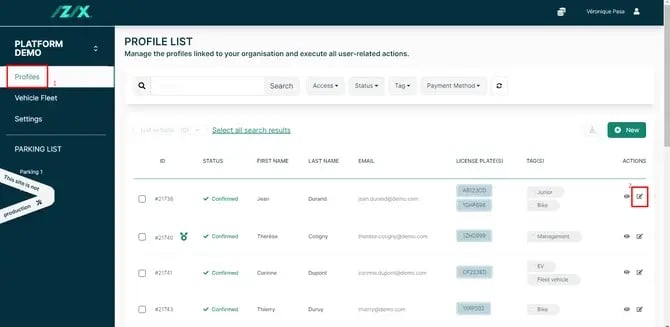
From the profile list, we have two options:
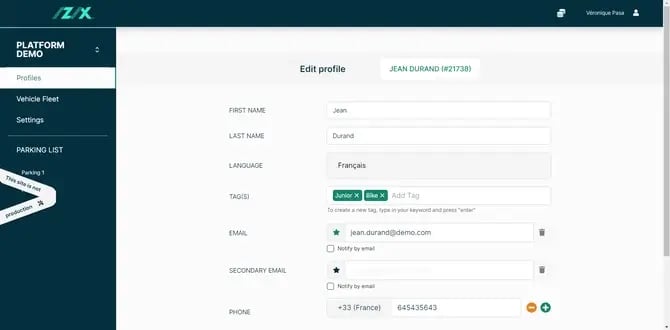
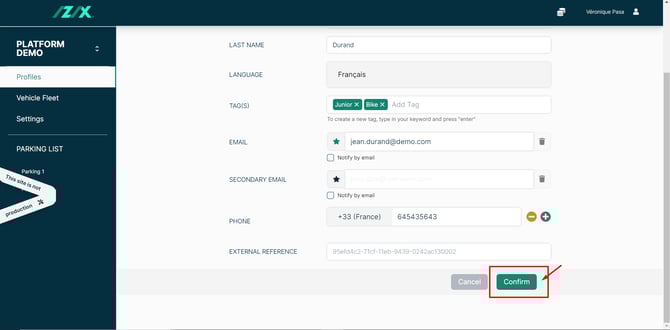
- Pencil icon - Edit: Directly edit the main profile information such as name, email, tag, phone and external reference.
- Eye icon - Show : Full overview of the profile, including role, licence plate, access rights, code, current reservations and more.
3. How to edit the main information (name, tag, phone)?
3. Make the necessary changes.