-2.webp?width=52&height=22&name=211112-BEPA001-IZIX-LOGO-RVB_POS_1%20(1)-2.webp)
This feature's availability depends on your subscription plan and role.
Definition: A release is a period of time specified by a user during which they won’t be using the parking lot. When releasing a spot, a user makes it available to other users, helping optimizing the usage of the parking lot by setting free the spots booked for them during this period.
Contents
1. Why should you release your parking spot?
Releasing a spot is a way for a user whose profile benefits from a preferential access to notify the rest of the company that he will not make use of his access during a given period. This frees up the spot and makes it available for other users during the release period.
/!\ It is essential to release your spot in case of extended leave because it is not made available to other users unless you proceed to the release.
2. How it works
Releasing your spot for other parkers is easy and simple.
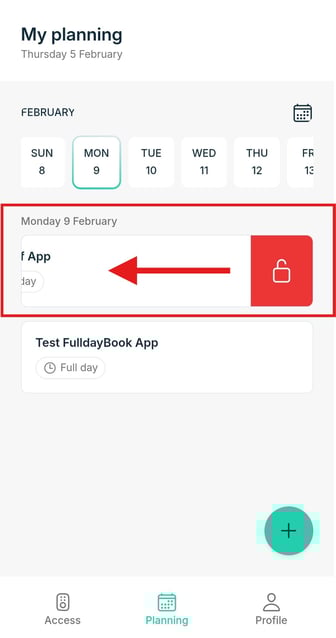
- Go to the Planning page in the app and select the day you want to release your spot. Slide the access right (spot) you want to release to the left and the release button will appear in red.
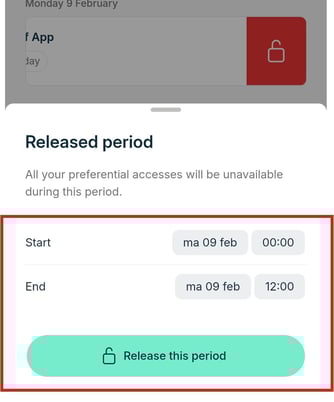
- Select the time period you want to release your for and confirm your choice.
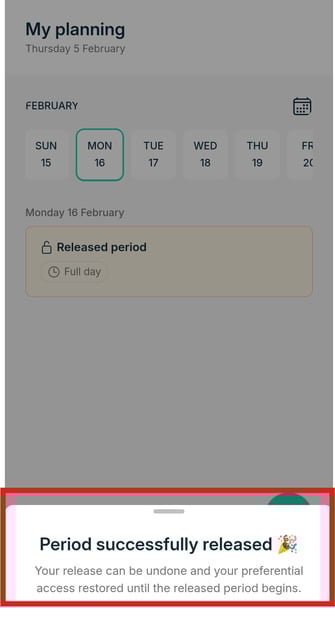
- The app will show you when your spot is successfully released. Your preferential access type card is now yellow on the Planning page and no longer available for you during its release period. Unless you cancel the release ahead of the starting time.
How to cancel your release period?
*It follows the same flow as releasing a spot
3. Tips
- Use this feature whenever you are not in need of a parking spot, so other parkers can use it.