-2.webp?width=52&height=22&name=211112-BEPA001-IZIX-LOGO-RVB_POS_1%20(1)-2.webp)
Contents
1. How it works
Booking a parking spot is simple and secure:
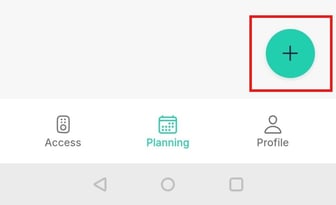
- Tap the “+” button on the Planning page.
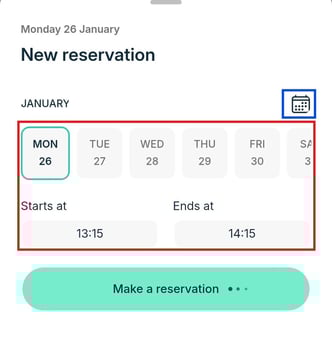
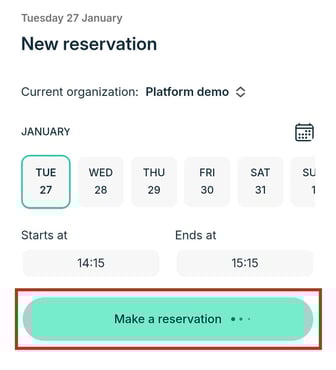
- Select your date and time. The app rounds to the nearest 15 minutes and blocks past times. Invalid selections are auto-corrected. Tap the calendar icon, highlighted in blue, to make bookings on later dates.
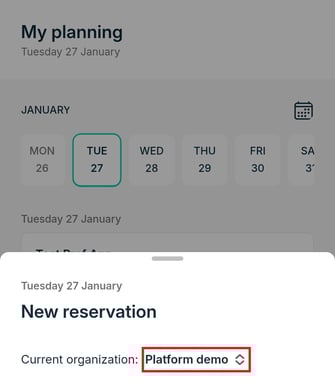
- If you belong to multiple organizations, choose the correct one. Changing organization updates available spots.
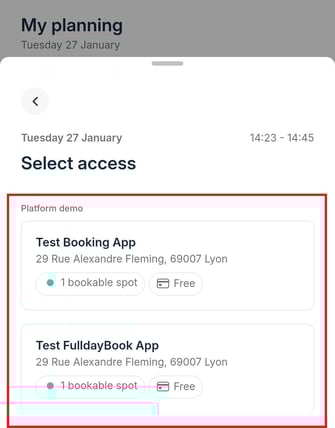
- Pick a parking location. See real-time availability, cost, and credits used.
- Review your reservation and tap Make a reservation.
2. Tips
- Navigate back without losing selections.
- Modal locks during confirmation to prevent duplicates.
3. Edge Cases
- Network issues or concurrent bookings show clear in-app errors.
- Access rights changes mid-flow update options automatically.
Success: Reservation details card shows date, time, location, and credits used.